Simple Steps to Protect Your Online Banking Login
Online banking has made managing money easier than ever. Whether you’re checking your balance, paying bills, transferring funds, or monitoring transactions, online banking provides convenience at your fingertips. However, this convenience also makes bank accounts attractive targets for cybercriminals.
Every year, thousands of people lose money because hackers gain access to their online banking accounts. In many cases, the attacks could have been prevented with a few simple security habits. The good news is that protecting your online banking login does not require advanced technical skills.
By following a few basic steps, you can significantly reduce the risk of unauthorized access and keep your financial information secure.
Why Online Banking Security Matters
Your online banking account contains some of your most valuable personal information, including:
- Account balances
- Transaction history
- Debit card details
- Personal information
- Linked financial accounts
If hackers gain access to your banking login, they may be able to:
- Transfer money
- Make purchases
- Change account settings
- Steal personal information
- Commit identity fraud
This is why securing your login credentials should be a top priority.
Step 1: Create a Strong Password
Your password serves as the first line of defense against unauthorized access.
Unfortunately, many people still use weak passwords such as:
- 123456
- password
- qwerty
- birthdates
- phone numbers
These passwords are easy for hackers to guess.
A strong banking password should include:
- Uppercase letters
- Lowercase letters
- Numbers
- Special characters
For example:
G#7mP!92xQ@4Lk
Avoid using personal information that can be found online through social media or public records.
Step 2: Never Reuse Passwords
One of the biggest security mistakes is using the same password across multiple websites.
If a shopping website, forum, or social media account suffers a data breach, criminals often test the stolen passwords on banking websites.
This tactic is known as credential stuffing.
Your banking password should always be unique and used nowhere else.
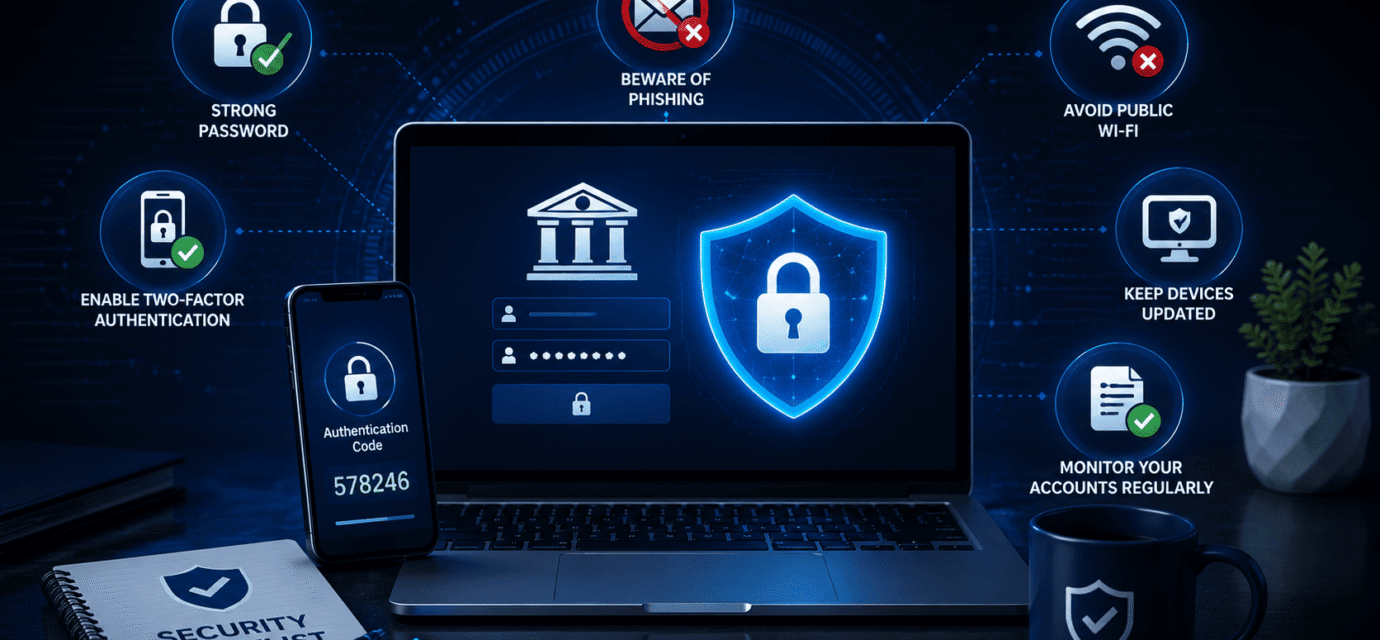
Step 3: Enable Two-Factor Authentication
Two-factor authentication (2FA) adds an extra layer of security.
With 2FA enabled, logging in requires:
- Your password
- A second verification method
This may include:
- A text message code
- An authentication app
- A security key
- Biometric verification
Even if someone steals your password, they usually cannot access your account without the second verification factor.
Many banks offer two-factor authentication free of charge.
Step 4: Avoid Public Wi-Fi Networks
Public Wi-Fi can create additional security risks.
Networks in places such as:
- Airports
- Hotels
- Coffee shops
- Restaurants
- Shopping centers
may not always be secure.
Cybercriminals sometimes use public networks to intercept information or create fake hotspots that appear legitimate.
Whenever possible:
- Use your home network
- Use mobile data
- Use a trusted VPN service
Avoid accessing online banking through unsecured public Wi-Fi.
Step 5: Watch for Phishing Scams
Phishing attacks are among the most common ways criminals steal banking credentials.
Scammers often send messages claiming:
- Suspicious activity detected
- Account locked
- Verification required
- Security update needed
These messages may arrive through:
- SMS
- Phone calls
- Social media
The goal is usually to trick victims into entering login information on fake websites.
Always verify banking alerts directly through your bank’s official website or mobile app.
Step 6: Keep Devices Updated
Software updates often contain security patches that protect against newly discovered vulnerabilities.
Keep the following updated:
- Operating system
- Web browser
- Banking apps
- Antivirus software
Outdated devices are easier targets for hackers and malware.
Enable automatic updates whenever possible.
Step 7: Use Trusted Banking Apps
Only download banking applications from official sources such as:
- Google Play Store
- Apple App Store
Avoid downloading banking apps from:
- Unknown websites
- Third-party stores
- Links received through messages
Fake banking apps can steal login credentials and personal information.
Before installing any app, verify that it belongs to your bank.
Step 8: Monitor Account Activity Regularly
Regular account monitoring helps detect suspicious activity early.
Check:
- Account balances
- Recent transactions
- Login history if available
- Card activity
Many banks offer instant alerts for:
- Logins
- Purchases
- Transfers
- Password changes
Enable these notifications whenever possible.
Early detection can prevent major financial losses.
Step 9: Protect Your Email Account
Your email account is often connected to your banking account.
If hackers gain access to your email, they may:
- Reset banking passwords
- Intercept verification messages
- Access financial communications
Secure your email with:
- Strong passwords
- Two-factor authentication
- Recovery information
Protecting your email helps protect your bank account as well.
Step 10: Log Out After Banking Sessions
While it may seem simple, logging out remains important.
This is especially true when using:
- Shared computers
- Public computers
- Work devices
Closing the browser alone may not fully end a session.
Always use the bank’s logout option when finished.
Common Mistakes to Avoid
Many banking security problems result from simple mistakes.
Avoid:
- Sharing passwords
- Saving passwords on public devices
- Clicking suspicious links
- Ignoring security alerts
- Using outdated software
- Downloading unknown apps
Good security habits dramatically reduce risk.
What to Do If You Think Your Login Has Been Compromised
If you suspect unauthorized access:
- Change your password immediately.
- Contact your bank.
- Review recent transactions.
- Enable two-factor authentication.
- Scan devices for malware.
- Monitor accounts closely.
Quick action can often stop fraud before significant damage occurs.
Final Thoughts
Protecting your online banking login does not have to be complicated. Strong passwords, two-factor authentication, regular account monitoring, software updates, and awareness of phishing scams provide powerful protection against most cyber threats.
Cybercriminals constantly search for easy targets, but a few simple security steps can make your banking account much harder to compromise. Staying cautious and practicing good online security habits remains one of the best ways to protect your money and personal information.
Recommended Articles
 How to Protect Your Bank Account From Dark Web Hackers Part : 3
 How to Protect Your Bank Account From Dark Web Hackers Part : 2
 How to Protect Your Bank Account From Dark Web Hackers Part : 1
 How to Spot Fake Security Emails From Banks
 how to protect your bank account from dark web hackers
 How Scammers Use Fake Bank Alerts to Steal Money